


Latest Version
Mariia Shumska
Tools
Mac
Free
1625640904
Report a Problem
More About Smart File Renamer
The Ultimate Solution for Digital Clutter
Imagine returning from a major photoshoot, finishing a massive design project, or downloading a giant archive of research papers, only to find yourself staring at thousands of cryptically named files like 'DSC_0921.jpg' or 'document_draft_v2_final_final.pdf'. Manually correcting these names can drain hours of your valuable time. This is where Smart File Renamer batch file renamer steps in to transform your messy directories into perfectly structured, professional systems in seconds.
Developed specifically for the macOS ecosystem by Mariia Shumska, this utility is categorized under essential productivity tools. It aims to eliminate the friction of organizing large media libraries, code repositories, and document archives by automating repetitive renaming tasks.
Why Use a Dedicated Batch File Renamer?
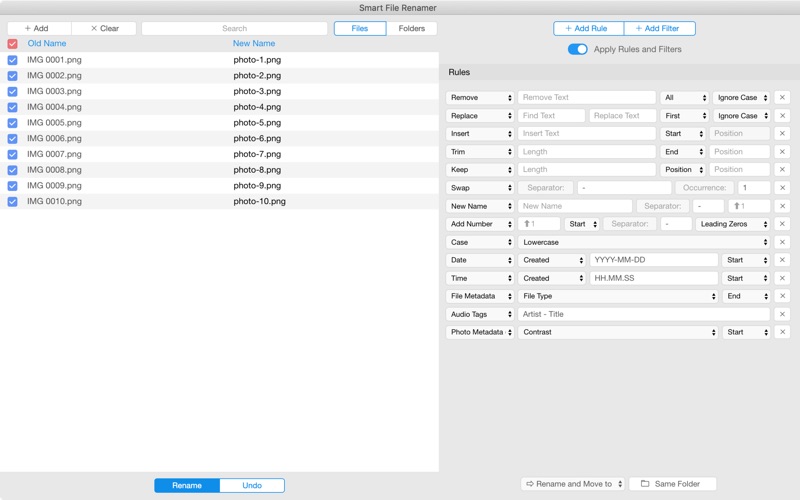
While macOS offers basic built-in renaming options, complex workflows demand a far more robust solution. The Smart File Renamer batch file renamer provides unparalleled flexibility by supporting hundreds of distinct renaming scenarios. Whether you need to append dates, replace specific strings, or modify file extensions, this utility handles it seamlessly.
Key Features and Capabilities
- Comprehensive Renaming Rules: Easily replace text, insert prefixes or suffixes, change letter casing, and strip unwanted characters or symbols.
- Multi-Scenario Support: Chain multiple renaming rules together to execute highly complex transformations in a single pass.
- Safe Preview Engine: View your changes in real-time before applying them to ensure your files are renamed exactly as intended.
- Native Mac Performance: Designed to run smoothly on macOS, handling thousands of files without lagging or crashing.
Who Is This Tool For?
This utility is a game-changer for creative professionals, developers, and office administrators alike. Photographers can easily organize shoots by date and location, developers can standardize asset names across codebases, and administrative staff can maintain strict document archiving standards without manual effort.
Streamline Your Workflow Today
If you are tired of wasting time on manual file management, it is time to upgrade your toolkit. You can explore this highly flexible utility and see how it fits into your daily routine by visiting the official App Store page. Head over to the official Mac App Store to download Smart File Renamer and reclaim your productive hours today.
Rate the App
User Reviews















Popular Apps










Editor's Choice